Four Function Calculator - Python Programming Project
Four Function Calculator - Python Programming Project
Couldn't load pickup availability
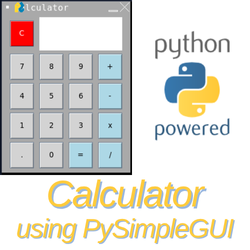
Create a simple four-function calculator in Python using the PySimpleGUI windowing library. By default, Python applications are text-based. The program prints its output to the screen, and the user responds via the keyboard. GUI applications are point-and-click, making the application easier and more familiar for the user. This project also introduces the basic concepts associated with object-oriented programming, one of the most common paradigms used in the software development industry today. With the skills you develop through this project, you'll be able to add graphical user interfaces to your Python program. You'll also be able to apply what you learn to creating GUIs in other programming languages.
Notes:
- The PySimpleGUI library is no longer available without a commercial (paid-for) license. You may use it for 30 days before it stops working. We are working on an update that will use the tkinter library. All who own this project will get the update for free! Learn how to use the PySimpleGUI graphical user interface library by creating a four-function calculator in Python.
- This project is included in our One Year All Access Plan.
Learn more: https://excaliburstem.learnworlds.com/course/calculator-pysimplegui
Overview video: https://youtu.be/0aoOP1vaguI

Want to use ClassWallet funds? Choose More Payment Options in the payment section, then select ClassWallet. We'll follow up to ensure we have all the information we need, then we'll send the invoice you need to submit to place your order!